Kafka on Your Laptop: Spring Boot Producer, Consumer and Kafka UI in One Compose File
· 5 min
kafkaspring-bootdocker-composekafka-uiproducerconsumer
I keep needing a small, honest Kafka setup to test a listener against: a broker, something that sends messages, something that receives them, and a window to look inside. This is that, in one repository: kafka-demo.
It replaces two older posts of mine (a Kafka UI setup and a separate producer and consumer) and the two small repositories behind them, kafkaproducer and kafkaconsumer.
Run it
You need Docker. Nothing else is installed on your machine.
git clone https://github.com/ergulcu/kafka-demo
cd kafka-demo
docker compose up --build
Send a message to the producer and ask the consumer what it saw:
curl -X POST -H 'Content-Type: text/plain' --data 'Merhaba Kafka' localhost:8787/message
curl localhost:8788/messages
The producer answers 202 Accepted with the event it created:
{"id":"63eefa38-3bb6-44c0-a50d-30668a2833be","text":"Merhaba Kafka","createdAt":"2026-11-22T20:29:45.994705931Z"}
and the consumer lists it, with the topic, partition and offset it came from:
[{"event":{"id":"63eefa38-3bb6-44c0-a50d-30668a2833be","text":"Merhaba Kafka","createdAt":"2026-11-22T20:29:45.994705931Z"},
  "topic":"demo.messages","partition":0,"offset":0,"receivedAt":"2026-11-22T20:29:46.505510955Z"}]
Kafka UI is on http://localhost:8085.
What is in the box
| Service | Port | What it does |
|---|---|---|
kafka |
9092 | One Apache Kafka 4.4 broker in KRaft mode, no ZooKeeper |
producer |
8787 | POST /message (the body is the text) and POST /messages ({"text": "..."}) |
consumer |
8788 | Listens to the topic. GET /messages and GET /messages/dead-letters show what arrived |
kafka-ui |
8085 | Kafbat Kafka UI, to browse topics and messages |
The producer and the consumer are two Spring Boot applications in one Maven build. A third module, contract, holds the one class they share: the MessageEvent record that travels as JSON.
public record MessageEvent(String id, String text, Instant createdAt) {
}
The broker: two doors
The part of the Compose file that trips people up is the listeners. Applications on your host reach Kafka at localhost:9092, but the containers must reach it by its service name. A broker tells every client the address to use from then on, so it needs two advertised addresses:
KAFKA_LISTENERS: CONTROLLER://localhost:9091,HOST://0.0.0.0:9092,DOCKER://0.0.0.0:9093
KAFKA_ADVERTISED_LISTENERS: HOST://localhost:9092,DOCKER://kafka:9093
KAFKA_INTER_BROKER_LISTENER_NAME: DOCKER
localhost:9092is for anything running on your machine: the IDE, Maven, a console tool.kafka:9093is for the other containers: the producer, the consumer and Kafka UI.
The same file therefore works whether you run everything in Docker or only the broker.
The producer
Two lines of configuration matter most:
spring.kafka.producer.acks=all
spring.kafka.producer.value-serializer=org.springframework.kafka.support.serializer.JacksonJsonSerializer
acks=all means the broker confirms a message only when all in-sync replicas have it. The serializer turns the MessageEvent into JSON.
The service builds the event, sends it and waits for Kafka's answer, so the HTTP response is honest: a 202 means the broker accepted the message.
MessageEvent event = new MessageEvent(UUID.randomUUID().toString(), text, clock.instant());
// The id is the key, so retries of the same event land on the same partition.
SendResult<String, MessageEvent> result = kafkaTemplate.send(properties.topic(), event.id(), event)
        .get(properties.sendTimeout().toMillis(), TimeUnit.MILLISECONDS);
If Kafka does not answer in time, the endpoint returns 503 instead of pretending it worked. An empty text is rejected with 400.
The consumer
The listener is a single annotation:
@KafkaListener(topics = "${app.kafka.topic}", groupId = "${spring.kafka.consumer.group-id}")
public void onMessage(ConsumerRecord<String, String> record) {
    MessageEvent event = parse(record.value());
    ...
}
It reads the value as a plain string and parses the JSON itself. That is on purpose: when a record is not valid JSON, the failure happens in code I control, and I can decide what to do with it.
Bad records do not block the topic
A message that can never be processed is the classic way to wedge a consumer: it fails, is retried, fails again, and nothing behind it moves. Here an error handler deals with it:
- A record that cannot succeed (not JSON, empty text) goes to the dead letter topic
demo.messages-dltright away. - Any other failure is retried twice, 500 ms apart, and then goes to the dead letter topic too.
You can try it. Send something that is not JSON straight to the topic with the console producer inside the broker container:
docker compose exec kafka /opt/kafka/bin/kafka-console-producer.sh \
  --bootstrap-server localhost:9092 --topic demo.messages
> this is not json
Then ask the consumer for its dead letters:
curl localhost:8788/messages/dead-letters
[{"key":null,"value":"this is not json",
  "reason":"... The record is not a valid message: Unrecognized token 'this' ...",
  "originalTopic":"demo.messages","receivedAt":"2026-11-22T20:30:03.693251200Z"}]
The original bytes are forwarded untouched and the reason is kept in the record, so you can see what was wrong and fix it. Meanwhile the next good message is consumed as usual.
Looking inside with Kafka UI
Open http://localhost:8085. Under Topics you will see demo.messages and its dead letter topic, with the number of messages waiting in each.
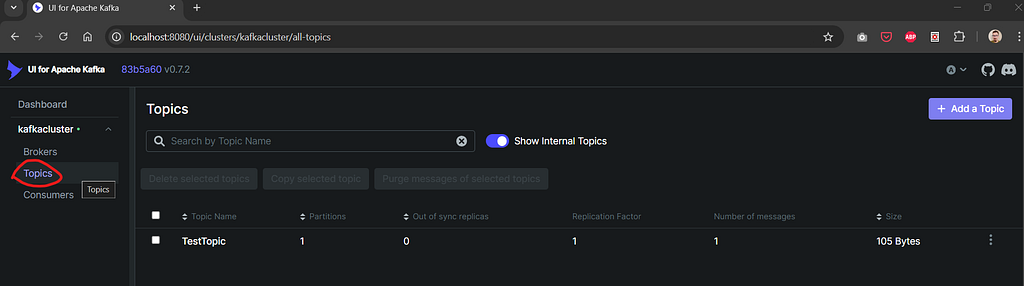
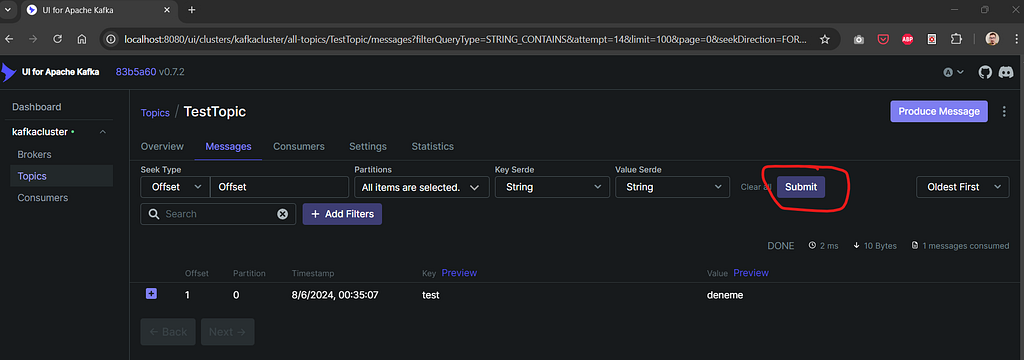
Click a topic, then the Messages tab, to read what is in it. Sometimes the message list does not load the first time; press Cancel and Submit and try again.
Produce Message lets you write a record yourself, with a key and a value. That is the quickest way to test your listener without the producer: type some JSON, or something that is not JSON.
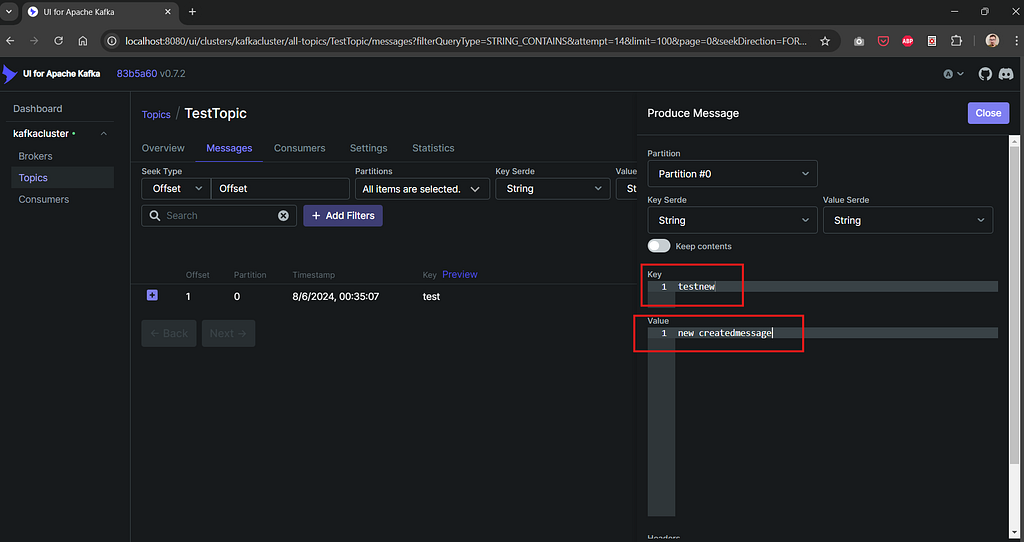
The screenshots come from an earlier version of Kafka UI and an earlier topic name (
TestTopic). The pages work the same way in the version in this repository, and the topic isdemo.messagesnow.
Only Kafka in Docker
When you are working on the applications themselves, start just the broker and run them from your IDE or Maven. The default localhost:9092 is exactly what the HOST listener serves:
docker compose up kafka
./mvnw -pl producer -am spring-boot:run
./mvnw -pl consumer -am spring-boot:run
Any Kafka client on your machine can connect to localhost:9092 the same way.
Tests
./mvnw verify
This runs the unit tests and the *IT tests against a real Kafka 4.4 broker in Docker; the latter are skipped when Docker is not available.
Settings
| Setting | Default | Where |
|---|---|---|
KAFKA_BOOTSTRAP_SERVERS |
localhost:9092 |
both applications |
app.kafka.topic |
demo.messages |
both applications |
app.kafka.retries, app.kafka.retry-backoff |
2, 500ms |
consumer |
The code is at github.com/ergulcu/kafka-demo.